TradeStation Help
Applying a TradingApp Store Product to Chart Analysis Window
Once you subscribe to a product from TradingApp Store, you can apply
the product to a Chart Analysis window. For more information, see My
TradingApp Store Subscriptions.
 Access by clicking the Chart Analysis icon in the TradingApps window, then enter a symbol
for the chart. Using the menu bar Insert
> Strategy menu sequence, select the My TradingApp Store Subscriptions
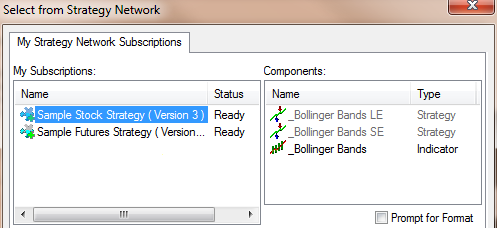
tab. The Insert Strategies > My TradingApp Store Subscriptions dialog
is displayed.
Access by clicking the Chart Analysis icon in the TradingApps window, then enter a symbol
for the chart. Using the menu bar Insert
> Strategy menu sequence, select the My TradingApp Store Subscriptions
tab. The Insert Strategies > My TradingApp Store Subscriptions dialog
is displayed.

Click
OK to apply changes or Cancel
to exit without changes. The product's component is now inserted into
the chart.